
How to navigate AWS as a solo developer

Say you're a solo developer or someone without an unlimited budget; stepping into the world of cloud development can be daunting. Easy to set up, but a mistake here or there and you're left with the bailiffs at your door. A quick Reddit search will show you horror stories of people being billed extortionate amounts for a multitude of reasons, over which you actually have control.
Leveraging the Free Tier
This is your biggest key to AWS. Digging through the free tiers will give you an understanding of which services to prioritise and which to avoid. One of the biggest free tiers in AWS is CloudFront. Pricing can be viewed here. But a quick overview is that they provide a pay-as-you-go free tier, which provides 1 TB of data transfer out and 10,000,000 HTTP/S requests per month. Those numbers are impossible to saturate with a low-traffic project, and if you do eventually scale up, CloudFront will happily scale for you. Read this post for some more clarity on CloudFront and CloudFront functions.
CloudFront is essentially a giant cache for your server, which means that by utilising it as much as possible, your origin doesn't get hit as much, and so you have lower bills in general.
Recently, AWS released flat tiers for CloudFront, and the free flat tier has worse limits at 1M requests and 100GB data transfer; however, it has a huge benefit for solo developers. It has no overage charges, which means if your website gets a surge of users, you won't end up with a surprise bill from AWS. There are limits on overage and throttling if you keep exceeding them; however, the higher flat tier that exists is quite generous, too.

The general principle for solo developers is to stick with flat tiers wherever possible. This will lead to a consistent bill every month without surprises. If you're only utilising a tiny amount of a flat tier, then switch to the respective pay-as-you-go. However, if there is a free flat tier, stick with that before switching, as it will give you peace of mind.
Billing and Alerts
While you're building on AWS, make sure you keep billing alerts at different price points to notify you when you're close to or have reached a threshold, which means you will receive immediate feedback on your bill. The AWS console is notorious for being behind on the current billing, and so these alerts will be a godsend to deal with the issue.
Setting up your alerts
First, we need to grasp a baseline cost that you're probably spending per month. The general advice of slapping a $0.01 alert is pointless if you have a recurring cost like AWS Route 53, so that alert just becomes a monthly nuisance. Once you have a general baseline cost for AWS, set your first alert to something slightly above that. This is your check to see if something abnormal has happened. Now take your average spending and multiply it by a number; that number is the risk you're willing to take. Set this new cost as the next alert; this is the alert you never want to see.
Early mistakes
Here are some mistakes people make when starting with AWS, common pitfalls that have devastating consequences.
Pushing keys to git
One of the most memed-upon things is pushing your AWS keys or any keys to git. Once you do it, it stays part of the history in that repo forever, which gives bots the opportunity to come and scan for them. If you've done this, remove the key from your git repository, remove the .env file from the index and create a .gitignore file. Also get a new set of keys too; those ones are considered compromised.
Too many permissions
Regardless of how you provide AWS credentials, having a set of credentials have too much control over your AWS services is significantly worse than not having enough permissions and getting thrown access denied errors.
Going straight to serverless
Serverless as a concept is amazing and completely free for low use; however, if you're planning on scaling up your application, sticking to serverless might actually take a larger chunk of your profits later. They scale with your usage, but so do your costs. If you stick with the tried-and-tested Application Load Balancer and auto scaling groups, your monthly costs will be higher; however, they are predictable. You can then scale up and down your servers with the ASG anyway, but you will never have that baseline zero cost again, unlike with serverless.
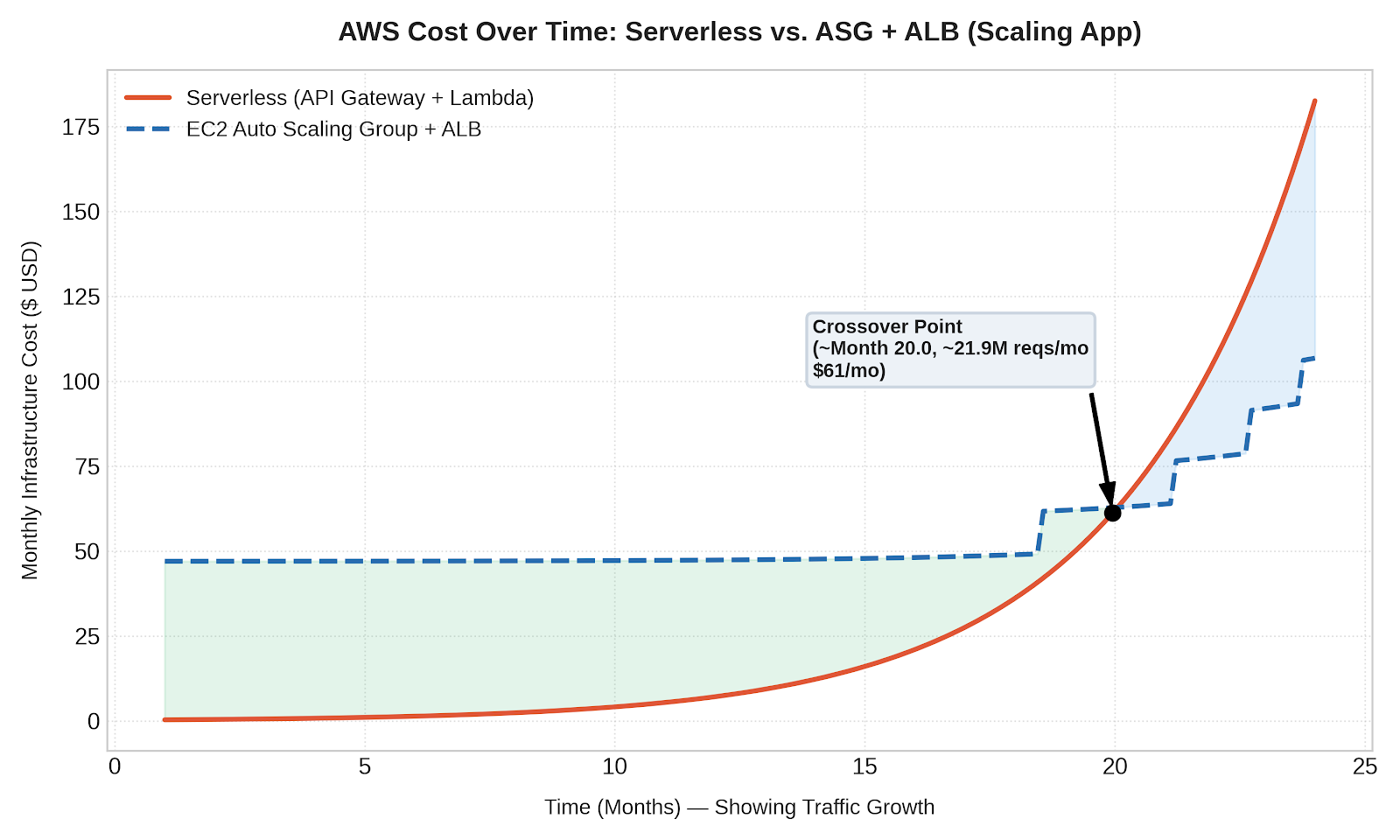
There is a point where the scaling costs of serverless will cost far more than fixed-cost infrastructure of the gold standard of ASG and ALBs. However, another good option is Fargate if you want that scaling without caring too much about the infrastructure.
If you have a service which can tolerate it, you can also go with a hybrid approach with ALB + ASG by setting up spot instances for your ASG; you can get cheap machines or more powerful machines for the same price as fixed-cost EC2 machines
Keeping unallocated EIPs
You'd assume that Ipv4 addresses would be free; you don't pay for one separately for your broadband or your phone. However, in the AWS world, we pay for IPv4s; however, IPv6s are free. On an EC2 instance, there are two ways to get an Ipv4 address: one is auto-allocated, which you can remove, and the other is an Elastic IP. Both ways will charge you, but the difference is EIPs don't auto-delete when you terminate your EC2 instance. The benefit of EIPs is that you keep the same IP so long as you keep paying. What's the benefit? You can keep running the same SSH command for different boxes since the IPs will stay the same. But holding onto these IPs when you don't need them or are not using them just adds cost that you don't need.
Attacking the untouchable
Your infrastructure is only exploitable if it's actually visible to the wider internet. An example is how your router home page is only accessible from within your own network but isn't being broadcast to the broader internet, and thus it is protected from bad actors
Unsecure security groups
Security groups are your first line of defence for your servers; they are essentially firewalls that guard ports and can be designated to specific IPs too. If you had the requirement of SSHing into your boxes, you would open port 22 and, if possible, restrict that to a specific IP, your IP. You will then be able to SSH into that EC2 instance, and no other IP will be able to even see that the port is visible
Cloudfront behaviours
CloudFront behaviours allow you to choose which endpoints to expose through CloudFront. A good use case is if you have a Swagger UI implementation on your server. Even in production, you still want to have access to this; however, if you expose your server through CloudFront, this Swagger UI will be accessible to everyone. If you want to remove it, with CloudFront behaviours it's easy to do so.
Custom headers
When CloudFront makes requests from the edge to your origin, it is able to tack on a secret message to tell the origin that it was the one talking to it, like a secret code phrase. This means that without that code phrase, clients are not able to talk to the server directly, even within AWS
Defense in depth
By using all the methods provided above, you can apply this in a Swiss cheese model to protect your application in layers. Each layer could have a vulnerability which the other layers should take care of.
Comments ()